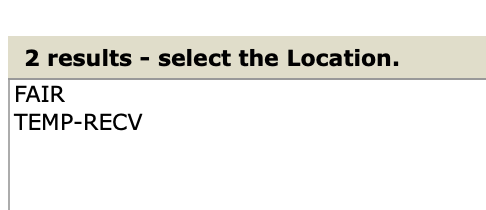
My cellar has slots that hold two bottles (in most of the racks) and each rack is a bin. The current format I have is the Location is the same for all (when I had multiple storage locations, this designated the facility it was in), and then the bin is something like “CA06” where C is which wall it’s on (which rack it’s in), A is the column, and 06 is the row. I don’t know how nerdy you want to make your features, but personally I’d be fine if you just gave me a required format, and I could write a script (or have claude do it…) to shove my CT data into the right shape.
It’s a separate topic, but I should also mention that I’m pretty heavily reliant on CT’s barcode features (for both bottles and bins), and I have QR codes on each slot that I scan as I’m putting bottles away, so I’d probably want something like that before completely switching over. But I get that this is an extremely niche feature so is probably appropriately low on the priority list.
When I tap the notification bell, the notification popup opens up half way off the window (this screenshot is the left edge of the browser window), so they’re not readable.
Ill gladly take the reserve bump to fit my 300 bottles!
When looking at the vintage charts some of the data feels off. for example under Napa 2013 is listed as a ‘lighter year’ despite the dark tannic wines. 2022 is listed as a benchmark vintage and sits above 2021 and 2023, which I think is something this forum would unanimously disagree on. Not a big issue just curious where you pulled the vintage ratings from
Slots are now bottle-shaped with urgency coloring, drink window bar, and wine info inside the bottle body
Depth layers grouped into a single card per row — much clearer that 2nd/3rd are behind the front, not separate rows
Slot width is dynamic — 6-column racks fill the panel, no more truncated names
New “Auto-place from data” button — if you imported from CT with bin location data, this builds your rack layout automatically with a preview before anything is saved
CT Import
Import wizard now offers to build your cellar map from Location/Bin columns in your CT export
CA06-style bin codes now correctly parsed (C=rack, A=col, 06=row)
Multi-bottle bins detected as depth automatically
Vintage Data
Full audit against WA, WS, JR, Allen Meadows, auction data
Expanded from 4 regions to 12: added California/Napa (was completely missing — 2013 now correctly rated excellent, 2020 flagged for smoke taint), Northern Rhône, Southern Rhône, Tuscany/Brunello, Rioja, Oregon, Germany/Mosel, Port
Corrected Burgundy 2018 and 2019 (both were underrated)
302 vintage data points, up from 36
Account Page
Was showing hardcoded “Reserve” and fake data for everyone — now shows your actual tier, email, and usage
Grand Cru shows ∞ with no progress bars
Billing consolidated to one Stripe portal link
Email change flow added for password accounts
Other
AI Sommelier responses now render bold/italic correctly
Notifications panel no longer clips off-screen or closes when scrolling
“Tap to review” on registry notifications now works
Cellar Map crash on bottle removal fixed (affected CT-imported wines with raw bin strings)
Oops. You exposed a flaw in my data I guess I’m not consistent with the capitalization of the location name. What’s the easiest way for me to fix this? I can easily clean it up in the CSV, but can I just re-import? Do I need to delete my data first? Or is there some way to bulk update the locations in the UI?
Great iteration speed. Nice work!
Edit: FWIW, it looks like CT ignores case on these, which is why I never noticed it before. Despite the capitalization inconsistency, it only lists it as one location:
Hey Sean — thanks for the detailed feedback on the bin format, that was genuinely useful and we built support for exactly your CA06 notation into the importer.
We pushed an update today that should fix your cellar map situation. Here’s what to do:
Go to the Cellar Map and delete the duplicate rack (the trash icon on the rack header)
Re-run your CT import with the same CSV — the importer now correctly groups Fair/FAIR as the same rack, parses CA06 bins properly, and detects your 2-deep slots automatically
You’ll see the new acknowledge → preview flow before anything is written, so you can verify the rack layout looks right before confirming
Your wines won’t duplicate — the importer matches on CellarTracker’s internal wine IDs so existing bottles just get their locations updated.
There’s also a new “Auto-place from data” button in the Cellar Map toolbar if you ever want to rebuild the layout without going through a full re-import.
Let me know if you hit anything unexpected — happy to work through it with you directly.
a few quick comments - best part of cellar tracker was ability to hit “drink soon” or “my best” and see list of responsive wines to then click on for more detail including recent consumption notes - I see similar features in your “analytics” section but no entries show under “drink now” or “peaking soon” for my wines, I also see that you can ask the AI Sommelier for your most valuable wines but this is not the same as a “best” list which presumably factors in ratings, also the market values are off, for example, 2016 MacDonald Cabernet shows a market value of $83 - I did find some of the “open tonight” suggestions reasonable - sorry if I missed responsive features on my first look and assume data will improve as you go forward
That’s a big issue for me. There doesn’t seem to be a concept of location and bin in this system so you can’t even filter on that criteria that’s imported in from CT. Also, there’s only one level of racks. What if I have multiple locations/cellars each with their own organization structure? Location and bin in the CT system works pretty well, but I want to be able to map those bins in a 3D system.
Your system could work fine for someone with a traditional single cellar with racks but CT works fine enough for that simple use case. The cellar map doesn’t work well when you have multiple offsites and locations each with boxes with 6 or 12 bottles and then I want to map where those boxes are physically located in the cellar.
Also, I print barcode labels for every one of my bottles and use a barcode scanner to move them around. So you would need to implement the barcode system like CT has and be able to migrate in all my existing barcodes that are physically on the bottles in order for it to be useful to me personally.
So, as much as I would love to find something better than CT, I don’t find this new app particularly useful for me.
In the list view, the default sort should probably be Wine and then Vintage. It is weird to see the wines grouped together but the vintages jumbled. Also, it seems like the wine names are getting truncated much shorter than needed.
Would love to give this a try and provide feedback; just created account. Have 1k+ bottles, can i get account upgrade?
One thing I’d like is to still be able to get tasting notes from other drinkers on wines i no longer have in inventory (but did at one point). For example, if I drank a 1994 Monte Bello and drank my last bottle, in CT, i would no longer see tasting notes in my feed from others. I’d find future notes valuable because it may help me decide if i want to try to source another bottle. Perhaps i drank it too early and its finally hit its stride. I know in CT i can always search the bottle individually, but i dont want to have to do that for every bottle I’m curious about.
Perhaps it could be put on a “watch list” so its clear its notes on bottle previously consumed (or bottles i may be interested in but never had in my cellar) and i want to track their evolution to determine if i want to source.
Great ideas, James. That sort of historical data is what wine collecting all about.
I’ve upgraded your account to Reserve. Have a look a look and let me know what you think.
I look forward to any other input.
Thanks,
Nick
I’m very sorry about all the troubles, Mike. Just looking through the database I see that the subscription tier for your account got mangled, which led the to the “Collection ran into a problem” error. The database has been corrected. I hope we haven’t lost your trust, but I get it if we have. Its been a bumpy ride.
That’s not the expected behavior. The Sommelier history should be be stored like a chat history. If you’re up for sharing it, I’d love to see what your Sommelier screen looks, you can DM if you’re up for it. I understand if you don’t want to share though.
Eiter way, we’ll keep trying to track it down on our side.

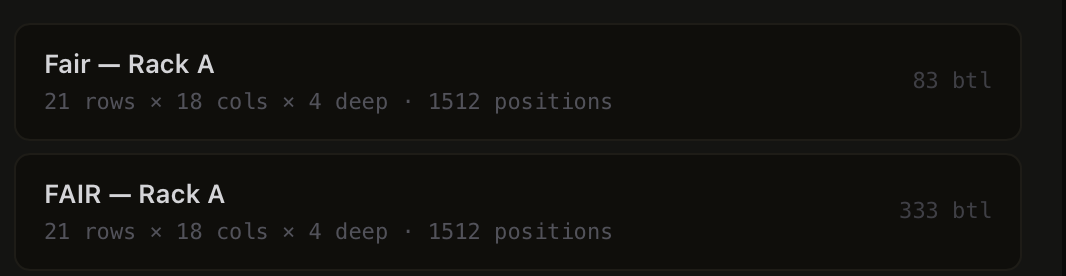
 I guess I’m not consistent with the capitalization of the location name. What’s the easiest way for me to fix this? I can easily clean it up in the CSV, but can I just re-import? Do I need to delete my data first? Or is there some way to bulk update the locations in the UI?