Greg-Open slots show clearly on the cellar map — no reverse-bottle tricks needed. Double-deep is handled by setting shelf depth to 2, so front and back positions are tracked independently. You’d see exactly which back slots are vacant.
1 Like
Is there a way to save previous questions/answers from the AI Sommelier?
1 Like
Deleted
Thanks for reminding me! The Change Log is now in place.
interested in trying this - just did download from cellar tracker and hit 100 bottle limit - can you raise for me so I can see all bottles?
thx
I would love to give this a try - any chance for a Reserve bump so I can import my full list?
Similar situation, happy to test out. Can you bump me to Reserve so I can import my whole collection and monkey around in it a bit?
You’ve been bumped up to Reserve!
I’ve bumped you up to Reserve tier!
1 Like
You’ve been bumped up to Reserve! Looking forward to your feedback.
I still cannot see all my wines, unless I am not reading it right.. limited to 500 wines. Not sure if this is the tier limit I am on.
Hi Mike-I found the issue, the account was setup with an errant w where there should have been an e. You’re email address and display name have been updated. This should resolve these issues.
Looking forward to your feedback.
Nick
Lweiss- Is your Sommelier chat history missing? Your conversations should be saved automatically. When you come back to the Sommelier tab your history will be right there. The only limit is that it keeps your most recent 20 exchanges — older messages are trimmed, but the sommelier retains a summary of what you’ve discussed so it stays contextually aware over time.
Nick - please delete my account winstuff64@gmail.com and update winestuff64@gmail.com to show all wines please.
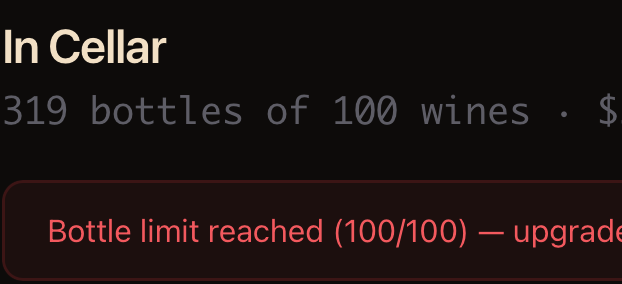
I feel like there should be a trial period for the higher tiers. I suspect that almost everyone who has a large cellar is going to want to be able to look at how it operates with their full inventory before committing to pay. I let it do just the portion it would import for free and it’s very hard to get a sense for what it would really be like to use.
Also, sorry if I missed it, but is there some way to automatically populate the cellar map? I have location data for every bottle in CT, and there’s no way I am going to manually place over 1000 bottles in a new app…
We’re providing complimentary Reserve memberships for WineBerserkers members. That was in my original post but I guess it was placed very prominently.
I’m happy to bump you up, just message me with your email address.
Sorry, no. There is no auto map feature. Its a good idea though. We’ll try to come up with something.
Mike- Done! You shouldn’t see that warning message any longer.
I appreciate your patience.
Sean-does your CT location data have one bottle per bin, or are bins shared across multiple bottles? Just trying to figure out how to parse the data.
Thanks
Nick