We’ve wrapped up our first beta round and used the feedback to build out CellarAged significantly. We’re opening it up for a second round and would love to get more of this community in.
— Visual cellar map. Assign bottles to physical rack locations. Find them without digging.
— Drink windows as a timeline, not a flag. Full arc — when it opens, peak year, whether you’ve already missed it.
— Vintage charts. Regional quality scores across 30+ years, overlaid with your actual holdings so you can see where your cellar sits vintage by vintage.
— AI sommelier. Ask what to open tonight, get food pairings, or find out what’s drinking well in your cellar right now.
— Structured tasting journal — aroma, palate, body, finish — with separate public and private notes. Attached to the bottle.
— Works properly on desktop and phone.
If you have a serious collection and opinions about what a cellar tool should do, we want to hear from you.
I’m in development for both Apple and Android apps — they will be added to their respective app stores very soon.
The site was built as a Progressive Web App though, meaning it can be installed and added to your Home Screen as an app:
iPhone: Open CellarAged.com in Safari > Login > Ellipses in the lower right > Share > View More > Add to Home Screen
Android: Open CellarAged.com in Chrome > Login > Ellipses in the upper right > Scroll to the bottom > Add to Home Screen
— Installable: Users can add the site to their home screen without an app store, launching it in a standalone window.
— Offline Functional: Service workers allow the site to work without internet or on low-quality networks.
— Fast & Responsive: Built to load quickly and adapt to any screen size (mobile, tablet, desktop).
Nick, the cellar map alone would get many to switch. I still can’t believe CT has no concept of where a bottle physically lives; I’m cross-referencing a spreadsheet every time I go to pull something, which kind of defeats the purpose. And showing drink windows as a timeline instead of one static field makes way more sense for actually deciding what to open next.
I was poking around the pricing page and one thing jumped out: 50 label photos and 5 shareable links on the Sommelier tier feels tight for a plan that supports up to 500 bottles. That’s probably your biggest user segment, and I’d guess a lot of them will hit those caps fast and feel nickel-and-dimed rather than motivated to upgrade. Might be worth revisiting those limits before they become a friction point in reviews.
Curious how the CT import handles edge cases too (older entries, custom fields, that kind of thing). I evaluate tools constantly and tend to send walls of text about UX friction and weird bugs rather than “looks good,” so if you’re handing out Grand Cru access for early testers, I’m happy to put it through its paces. Collection-size, though, I’d only be in the middle group.
Quick note:
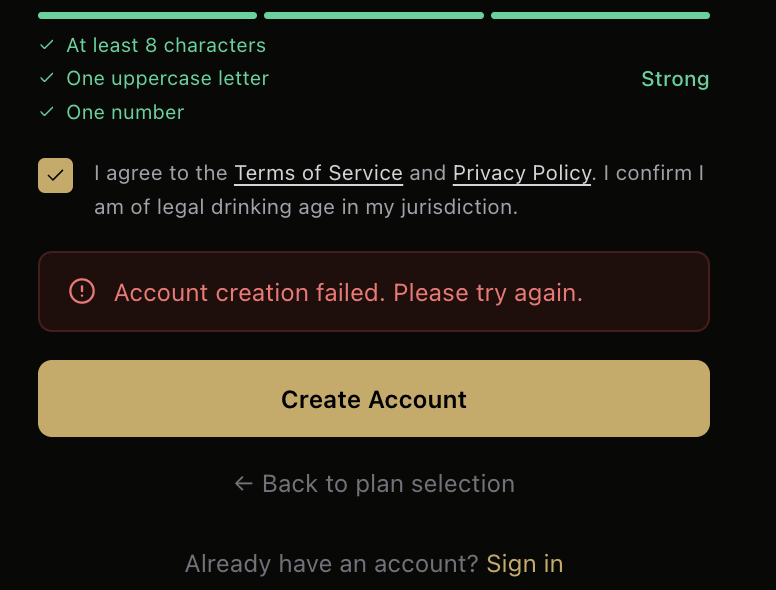
I attempted to create a free account to check it out, and got this error. The error does not indicate what failed. The password seemed to meet the requirements.
Maybe a stupid question since I’m not super familiar with CellarTracker. I’m having trouble finding where on CellarTracker to download My Cellar inventory. Is that on the app or desktop?
I just got a big wine fridge finally so I am looking into different tracker options atm. Good timing! Here are some initial thoughts and bugs I found.
I would like the visual view of the cellar to look better. Specifically i don’t like that i have to hover over each bottle to see the name, and click on the bottles to see the back row
add option to just add the year/month when adding a bottle, remembering the exact day and month can be annoying
when i try and edit a bottle and save it makes me re fill out all of the bottle info
every time I add a bottle It adds it twice
Wont let me import a whole folder or gallery of label photos at once
Tried to us the AI and it immediately ‘encountered and error’
got this error a few times when adding bottles, I think its from not having a price, which I would like to be able to skip adding. I dont care too much about the value of my bottles they are all getting opened!:
Failed to save: Function addDoc() called with invalid data. deleteField() cannot be used with set() unless you pass {merge:true} (found in field purchaseLots in document users/GydZ3sgdG5cfyaU0dGTPN8khsPW2/wines/jrumWwyGtcMZ6FOhETwP)
I’d be happy to unlock a Grand Cru membership in exchange for a thorough report.
I’ve added some additional error reporting to the sign-up process, hopefully that help diagnose the sign-up issue.
What fields does it import from CT? All of them, including bottle notes, purchase notes, tasting notes, tasting stories, purchase info, consumption info, privately added professional tasting notes, etc?
I tried to import my cellar to put it through the paces, but it appears the import only supports 5,000 bottles? Do I need to break it up into multiple files?
I came up with a pretty decent scheme to organize things so that I have a pretty good idea where they are, but with boxes on top of boxes, multiple layers deep, a 3D map is what I’ve been dreaming about building for years.
Found it. I don’t use the full version of CellarTracker, just mobile and the app. Maybe reference the export location on the full site?
I do have some feedback:
When adding a bottle to collection it’s hard to change the default quantity of 1. You can’t delete the 1. You have to double tap on it to delete it.
Searching my collection by producer brings up the tiles but it doesn’t show the name of the wine. Example Realm The Bard shows as a Bordeaux Blend. I would have to know that to find it.
When adding a bottle and I don’t have it in front of me, instead of typing all of the information manually, Is it possible to add a search feature where you can select the wine by producer? Example search Realm and have the list of their wines come up. CellarTracker does this and makes it much easier.
The Drink Now tile. How do I interact with it to see what those bottles are?
We pull over as much as CellarTracker will give us. For each wine that comes in, you’ll get your full inventory details — producer, vintage, region, varietal, bottle size, bin location, purchase price and date, drink window, and all your critic scores (JG, WA, WS, and the CT community average).
If you include the optional Notes and Private Notes exports, we’ll also bring over your personal tasting notes — including multiple tasting entries for the same wine, kept in order with their dates — along with your private annotations and your most recent tasting date.
A few things we weren’t able to get to, not because we didn’t try, but because CellarTracker simply doesn’t include them in any of their exports:
Your consumption history (bottles opened, when, how many)
Per-bottle and per-purchase notes
Tasting stories
Critic notes you’ve privately saved to a wine
Label photos
Wishlist items
If any of that data is important to you, we’d recommend keeping CellarTracker accessible as a reference while you settle in here. We know it represents years of your notes and history, and we don’t take that lightly.
How long does the import take? The wheel has been spinning for a while now and I’m wondering if it’s because I signed up for the free account but imported 516 bottles.
EDIT: I stopped it and it appears to have imported most of my bottles. Do get some “Unknown” items, but unsure if that’s from how they were in CT or if I just cut off the import too soon.
EDIT 2: AI not functional
EDIT 3: When I cut off the import, it showed my bottles. I was able to use the site and look at them briefly. But then when I logged out and back in they were gone.
Eric — great timing, and this is exactly the kind of feedback that’s useful. Good news: most of what you hit is already fixed in the latest build.
Cellar map visual — overhauled completely. Bottles now show lying on their side with the label facing you (like a real rack), producer name, wine name, vintage, region, and a drink window progress bar all visible directly on the bottle without hovering. Back rows are visible without clicking — depth rows 2 and 3 show inline below the front row. Click any row number to open the full 3D shelf view.
Purchase date flexibility — the date field now accepts just a year (2022), year/month (03/2022), or a full date. No more hunting for the exact day.
Edit re-fill issue — fixed. Country, region, and varietal now pre-populate correctly when editing, including wines imported from CellarTracker where the values don’t match the standard dropdown lists.
Double-add — fixed with a submit guard that prevents the form firing twice on mobile.
Bulk photo import — the Gallery button now supports multi-select. Pick a whole batch of label photos at once and it walks through them one by one, auto-advancing after each save.
The deleteField() / purchaseLots error — fixed. Price is now fully optional — leaving it blank no longer causes any errors.
AI error — still investigating that one. If you hit it again, what were you asking it?
Appreciate you taking the time to write it up properly.
Andrew — the 5,000 bottle limit is gone. I’ve bumped your account to Reserve tier, so you’re clear to import the full thing. The limit is now 50,000 rows per file, so no need to split anything.
The boxes-on-boxes situation is exactly what the depth dimension in the cellar map is for. Each rack supports up to 8 layers deep, so you can model stacked boxes directly — front layer is what’s accessible, back layers are buried. The map shows all depths inline so you can see what’s back there without having to physically dig.
Would love to hear how it handles your setup once you’re imported — a collection organized that carefully is a good stress test.