Forgot password does not work took me back to the login page again as of 10:14 PM Eastern time
I am in, don’t have much time to play around now, but will in the next week or two. I do have 514 bottles uploaded and it says the limit is 500 and upgrade now. What happens if I don’t upgrade?
Also, you can export Consumed Bottles from CT. Do you have a feature to import that into CA? Same for Tasting Notes
It says all my wines can’t be imported due to missing wine name. I included all available fields from CT in the export.
Also the instructions are a little bit confusing because it says to go to my cellar and then inventory. When I click on my cellar, I see the export button at the top right, I click on that and it opens a modal where I choose wines from all pages and then text delimited. There is no option for inventory.
(And then it downloads a TSV file which I have to rename to CSV in order to be able to load it in the system.)
After you click on wines in your cellar, then export in the top right, there should be an option in the top right of the popup to select csv
Andrew — two things just fixed. The importer now accepts TSV files directly without renaming, and handles CT’s tab-delimited format automatically. That should also fix the missing wine name issue since CT uses a different column header in TSV exports.
On the instructions — you’re right, will update those. The correct path in CT is My Cellar → Export, then choose Text-Delimited. The file it downloads works directly now.
Hi Mike — the password reset flow is fixed. If you head to the forgot password page and request a new link, the email should arrive shortly and take you directly to a page where you can set your new password. Be sure to check your SPAM or Junk folder.
Sorry again for the trouble getting in.
Yes, I am in.
It imported all my wines then dropped the list back to 500. Is there a trial for an unlimited bottle tier so I can explore the site?
Hi Mike. What email address did you use when you setup your account?
Deleted
I’ve bumped you up to Reserve.
Looks like the CHANGELOG 404s: https://cellaraged.com/changelog
Thank you
Thank you! Im looking forward to your feedback.
1 Like
so if I’m just scrolling through my wines and I find one I want I have to then go to the virtual map? I have no need to map them, I just need to quickly know which box their in and then I can go to that box
no luck on readding to my home screen and every time I go to the site on a new browser tab I have to relogin
also is there a function where I can search for wines and they just pop up? it appears I have to scan a label or enter the exact details, I add many pending wine shipments before they arrive to get ahead of it
Nick, curious if you app will enable user to identify easily open slots in the cellar. Some of my racking is double deep. Because CT cannot show open slots, I need to reverse bottles in the front slots to tell me which back slots are vacant.
2 Likes
I really like the idea of the Cellar Map - it’s a clear differentiator from CT. Some initial thoughts on the UI after playing with it a bit:
- Dragging and dropping bottles into the map is okay for small racks but doesn’t work great for larger ones due to scrolling and not being able to see the column number. Additionally, large/wide racks make the display prohibitively small (my example: racks are 18hx40wx2d).
- Once you drag into the map, you can’t change the location by dragging again. You have to go to the wine listing in the collection and edit the location code. That’s a frustrating workflow if you accidentally drop a bottle in the wrong slot.
- Suggestion to solve both of the above: give the option to enter coordinates on the Cellar Map page instead of having to back out to the collection. Would also help to make the location codes a bit more human readable.
- I assume that the icon at the end of each row represents a drawer in a wine fridge. This doesn’t hold much meaning for a traditional wooden cellar rack. Give an option to disable?
- I don’t see the flyout view that you mentioned earlier in the thread?
- Why do the rows shrink as you go down? This makes tracking a column down the page really difficult.
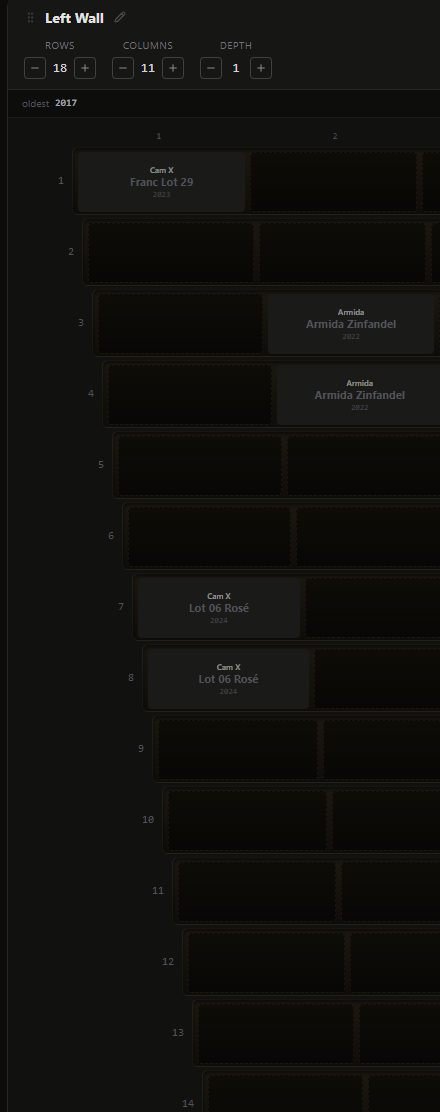
Another UI suggestion: Can you make a “day” mode or a high-contrast mode? I’m finding some of the text really difficult to read.
I’ve always been interested in having a cellar map. Primarily to see open slots.
Before I sign up, import and test, does your product have that ability?
It sure does! I trying out some different configurations to get a sense of what people like and dislike, as we go through beta testing.
jmaiman- Great idea, we’re actually in development on a light mode and a light/dark mode toggle.Thank you for the feedback.
1 Like