- You will want to change your bookmarks, make a new one, as whatever your default was before might not be what it is now. I’m not sure what you mean by ‘iPhone function bar’ - do you have a screenshot?
- There are a number of threads on ‘my posts’ - we’re working on that, trying to see what is happening as many have all their posts linked but not all, and obviously THIS group REALLY wants to see their own content

1 Like
The bookmark access is the one that works best. The home page icon is one I just added today. It doesn’t give me the function bar in the attached pic. It has <, >, functions menu(square with up arrow), bookmark icon, tabs icon.

I just tested this and it does not seem to hide the muted user’s posts. Note that the explanation in Preferences - users only says “Suppress all notifications and PMs from these users” - it does not say it will hide their posts.

Nope. Just the first two options showing for me, no “Ignored.”
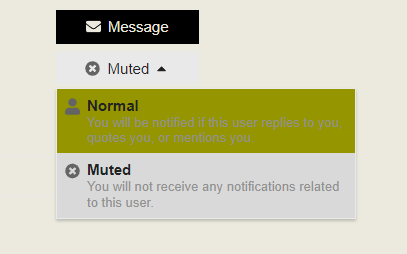
Dig deeper - click the username, then again, then where it says ‘normal’, click the dropdown

You don’t have that? Might be a ‘permissions’ thing
1 Like
You are correct. That is the menu I pasted from. Beneath “Message” I click on “Normal” and the dropdown gives me just the two options - no “Ignored.”
2 Likes
Try now
1 Like
Well, lookee there! (Old-time “cheers” emoji here)
it’s because your ‘rank’/trust level was too low - I have to figure out how to get all the more seasoned users to automatically go up in trust level
4 Likes

Brig, try now and let me know - it’s a ‘trust factor’ thing that I’m trying to override
Nope, old posts that are links are just the raw text.
What’s weird is I literally selected the text from one of the Twitter posts and pasted that into a new reply and it displays correctly.
So it’s just links before the switch.
I’m probably just stupid, but I can’t find the right setting for my iPhone. I’d like to have what I see on my desktop screen, which is as it was before - the name of the thread with the author’s name beneath, then on the right the name of the last person to post.
On my phone, I can only get this:

or this:

Is there any way I can fix it? Thanks!
if you click on the three lines (menu) icon in upper right you should be able to choose “Desktop View”
Thanks Julian, I knew I was stupid, just not how stupid!
not stupid, just a matter of finding it!
FWIW there is also an iOS app called “Fig” that can act as a reader for multiple discourse based sites, and uses its own UI. I have not experimented extensively with it.
Can somebody please explain what the heck “discourse” is in this context?
framework/platform that implements the forum UI.
1 Like
old forum was PHP as the base. the new forum is Discourse